How to Convert Image Sheet Music to a Playable Digital Score in 5 Seconds
If you are a practicing pianist, teacher, or live session player, you know the routine: you find a sheet music PDF or a physical book of a song you need to learn, and then you spend hours playing through it note-by-note, or manually inputting it into Sibelius, MuseScore, or a DAW to hear how the arrangement actually sounds.
Manually inputting notes, fixing accidentals, and setting up playback is a massive time sink that keeps you away from your actual instrument.
With ScoreFlip, we wanted to eliminate this workflow bottleneck completely. In this guide, we will walk you through how to capture a clean sheet music photo with your phone or tablet, process it using our advanced Optical Music Recognition (OMR) engine, and play it back in 5 seconds.
---
Step 1: Capture or Upload Your Sheet Music
The first step in the pipeline is capturing your sheet. You can use your smartphone, tablet, or desktop camera to snap a clean photo, or upload an existing PDF, PNG, or JPEG from your files.
For the most accurate recognition, physical scanning hygiene is critical. Follow these quick capture tips: - Align parallel: Hold your camera directly parallel to the sheet music. Strong angles warp the horizontal staves, which makes it harder for the OMR engine to align bar lines. - Flatten the page: If you are scanning a thick book, gently flatten the binding creases. Curved pages distort staff lines and note heads. - Even lighting: Avoid harsh shadows across the page. Strong lighting differences can cause the image scanner to mistake shadows for bar lines or note stems.
 Capturing the sheet music using the mobile application scanner.
Once you click capture or drag-and-drop your sheet into the desktop dashboard, ScoreFlip initiates the transcription parser.
---
Step 2: Let the OMR Engine Run Its Magic
Behind the scenes, ScoreFlip runs an advanced optical recognition engine trained on hundreds of thousands of historical print engravings. The OMR engine works in three sequential phases:
1. Staff Line Extraction: The system identifies and isolates the horizontal staff lines, establishing the coordinate system for the rest of the sheet. 2. Symbol Classification: Clefs, key signatures, time signatures, bar lines, notes, accidentals, rests, and articulation markings are categorized in real-time. 3. Semantic Reconstruction: The system groups the symbols into active musical voices, aligning note durations with the time signature and creating a synchronized multi-track format.
 The OMR engine processing and classifying notation in real-time.
The processing phase takes roughly 2 to 4 seconds, depending on the complexity and resolution of the source image. During this time, ScoreFlip converts the visual arrangement into a highly structured notation document.
---
Step 3: View, Review, and Adjust
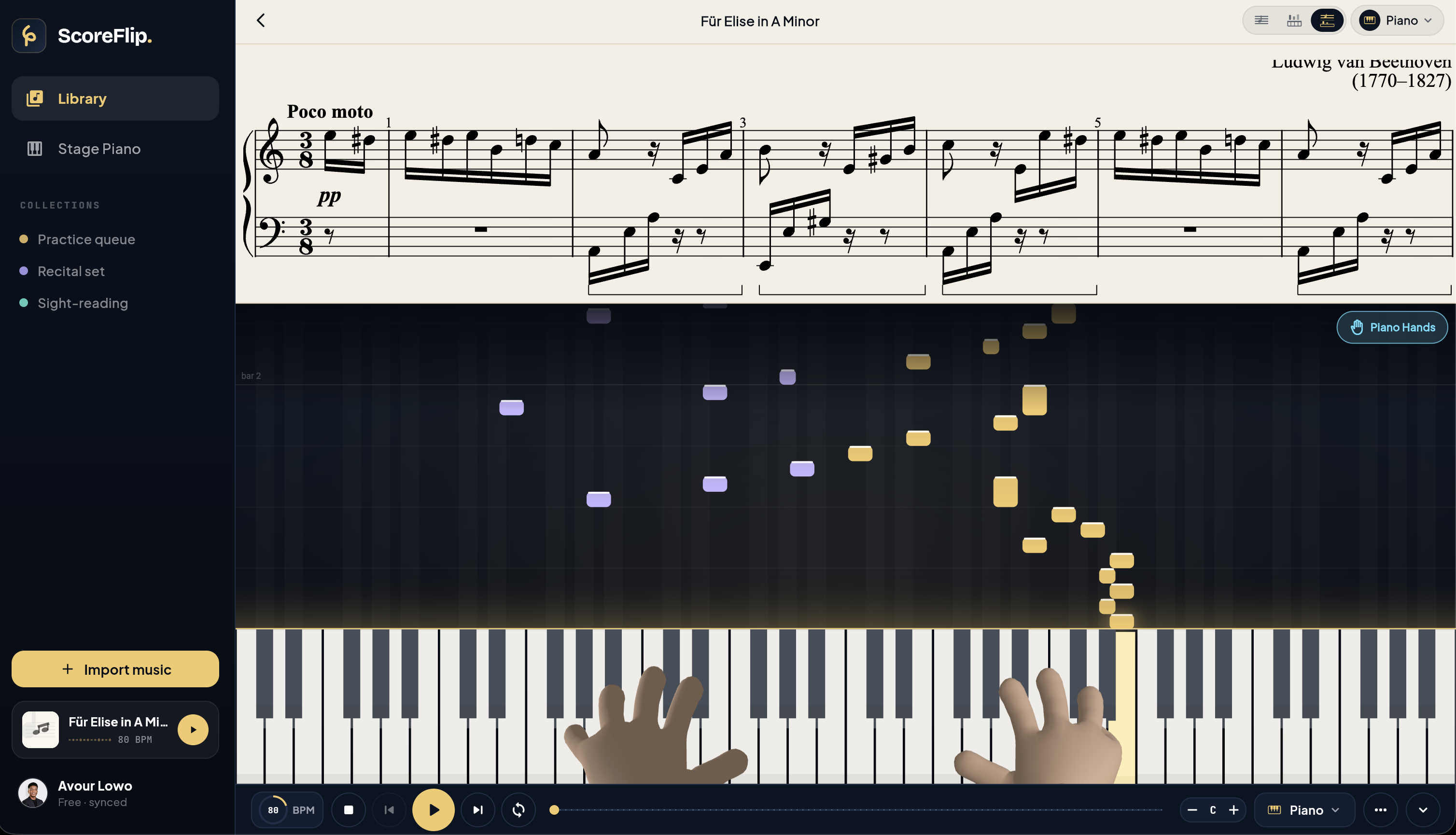
Once processing is complete, your static image is instantly transformed into an interactive, digital sheet music interface.
The active Score Viewer displaying the transcribed notation.
In the Score Viewer, you will see your original print layout rendered as clean, high-contrast digital notation. From here, you can: - Hit Play: Instantly hear the entire score played back with precise MIDI timing. - Select Measures: Tap any bar line to start loop-playback for focused practice. - Inspect Transcription Confidence: The OMR engine highlights symbols with lower confidence metrics (often due to hand-drawn annotations or poor scan quality) in red. You can quickly double-tap these notes to adjust their pitch or length in the editor.
---
Step 4: Choose Your Playback Voice
One of the major shortcomings of traditional notation apps is the dry, robotic General MIDI playback. Listening to a tinny acoustic piano synthesizer is not inspiring and does not help you feel the dynamic nuance of the piece.
ScoreFlip solves this by offering a selection of high-fidelity, studio-recorded instrument voices. Before hitting play, you can configure your stage voice.
 Choosing a playback instrument voice.
You can select from: - ScoreFlip·88 (Vintage Electric Piano): Our flagship virtual instrument. It features warm detent controls, active tremolo, and lush spring reverb modeling, perfect for jazz sheets and modern arrangements. - Concert Grand: A high-resolution, multi-sampled 9-foot grand piano with deep acoustic resonance. - String Ensemble: A rich, legatized string section that fills out the harmony, making classical or pop arrangements sound orchestral. - Analog Synth: Perfect for lead melodies, electronic sheets, and modern production templates.
By combining advanced OMR with rich acoustic modeling, ScoreFlip ensures that your paper sheets don't just become playable—they sound professional and inspiring. You are ready to plug in your headphones, pull up your keybed, and start playing.
Enjoyed this deep dive?
Explore more articles on notation scanning, electric keyboards, and gamified music practice in our journal.
Explore All Articles